
Traditional DLP was designed around a person at a keyboard moving data somewhere it should not go. The typical cases are an employee uploading a customer list to a personal Dropbox account or emailing a sensitive spreadsheet to a personal address. DLP tools catch those cases by watching browser uploads and outbound email. AI agents have widened the surface area because they can move the same data through channels those controls do not monitor.
How AI agents bypass traditional DLP controls
An employee who wants to move a spreadsheet to a personal Dropbox account no longer has to upload it through a browser. They can ask an AI assistant connected to Dropbox through MCP (the Model Context Protocol, an open standard that lets AI tools connect to outside apps and services) to upload the file for them. The agent reads the file from disk and sends it through a tool call. The transfer never passes through the browser upload or email client that traditional DLP inspects.
How an agentic employee can leak data without any human involvement
The next version of this problem involves agentic employees that run business workflows on their own. One example is an agent assigned to produce business reports, which reads the CRM and several other data sources to compile each report. A few CRM records contain credit card numbers in the notes field, and the agent pulls those records along with the rest of the data. It passes everything to a mailer agent, which builds the report with the card numbers included and sends it out. The company has leaked PCI data without any person choosing to send it.
Insider risk programs have usually focused on the intent of the person moving data, whether that person is careless or malicious. Agents have access and a task but no intent, so DLP for agents has to evaluate each action at the moment it happens.
The three DLP enforcement points in the AI agent loop
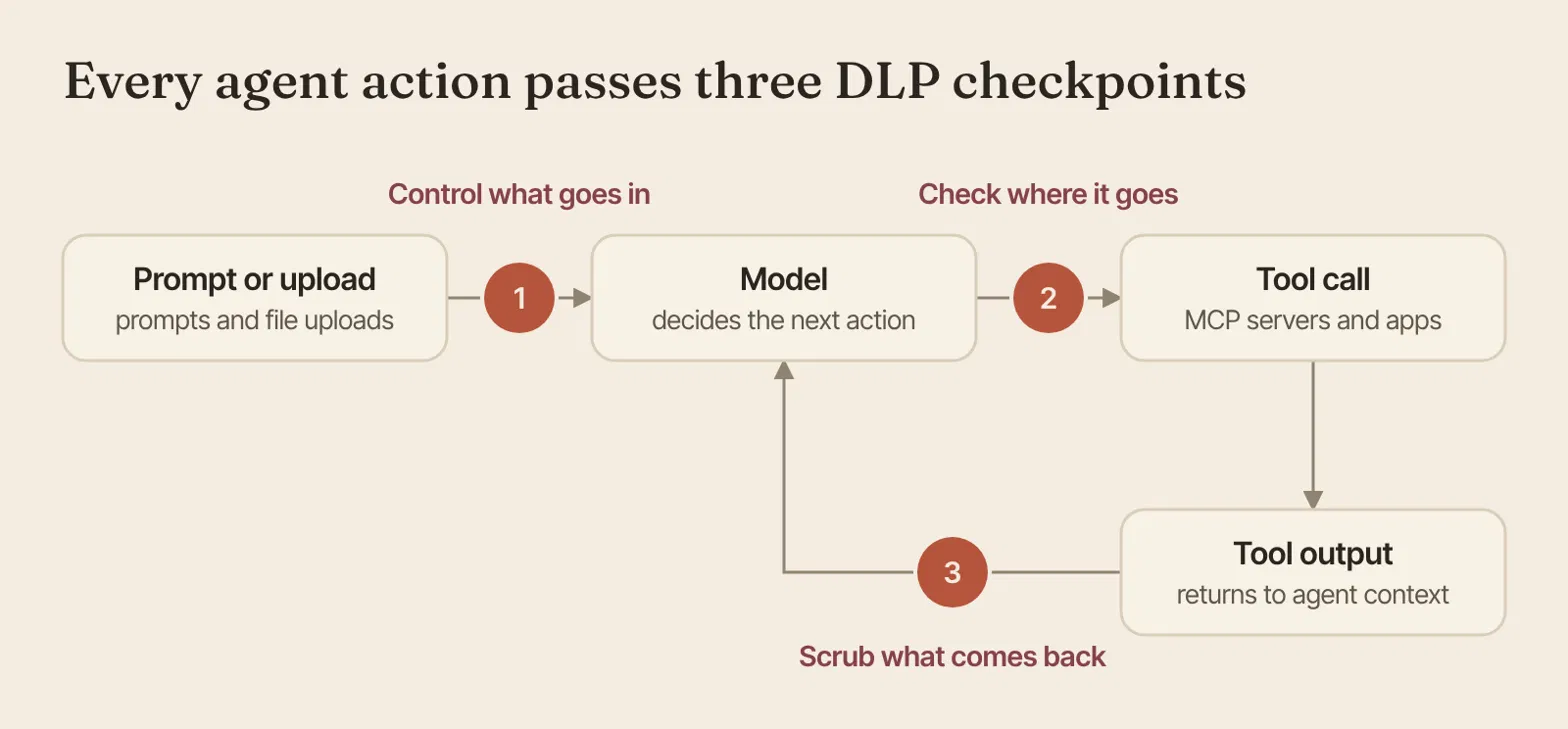
Humans and agents follow the same loop when they use AI. Input goes to the model, the model chooses an action, a tool carries out the action, and the tool’s output returns to the model as context. DLP policies can be enforced at three points in this loop.
1. Pre-inference: control what goes into the model
The first enforcement point covers everything sent to the model, including prompts and file uploads. Sensitive data is blocked or redacted before it reaches the model. This also keeps the data out of the agent’s shared memory and context, where later steps or other agents could otherwise reuse it.
2. Post-inference, before the tool call: check where the data is going
The second enforcement point evaluates the action the model has chosen, including where the data is headed and whether the action is legitimate. An upload to a personal Dropbox account or an email to an outside address can be stopped here before any data leaves. When an action violates policy, the policy blocks it and steers the agent toward a different course.
3. Post-tool call: check what comes back
The third enforcement point inspects tool output, which goes directly into the agent’s context. A CRM query or a file read can return more sensitive data than the task requires, so sensitive values are scrubbed before the model sees them.
How the three enforcement points apply to the two examples
In the Dropbox example, the second enforcement point stops the upload because the destination is a personal account. In the CRM example, the third enforcement point removes the card numbers from the CRM data before the mailer agent receives them. If the employee in the first example had attached the spreadsheet to the prompt instead of naming its file path, the first enforcement point would have caught it before the model saw it.
Why DLP has to steer an agent after blocking an action
A blocked agent behaves differently from a blocked employee. An employee whose upload is blocked usually stops or contacts IT. An agent working toward a goal will often look for another way to complete the task, such as uploading the file to Google Drive or emailing it to the same personal account, and every retry gives the data another chance to leave the company.
For that reason, the check before the tool call should explain the block to the agent as well as stop the action. A message such as “files containing customer data cannot be sent to personal storage” gives the agent enough information to abandon the task, while a generic error leaves it free to keep trying other routes.
Why the endpoint is the right place to enforce DLP for AI agents
Agent frameworks offer hooks that can see exactly what an agent is doing. Hooks have to be deployed separately for each AI tool, and users can remove them. Some AI tools do not support hooks at all, which leaves gaps in coverage. Remote AI gateways avoid per-tool deployment, but they operate away from the device and cannot see which file the data came from or which user identity sent it.
An endpoint agent addresses both limitations. All three enforcement points pass through the model’s API call on the device, where the endpoint agent can enforce policy for every AI tool installed. The endpoint agent also has the device context that remote AI gateways lack, including which file is involved and which user identity is behind the request.
How Anzenna enforces DLP for AI agents and employees
Anzenna provides a DLP policy layer written in plain English, along with an endpoint agent and browser extension that enforce that policy consistently across your agentic and human workforce. If you need to future-proof your DLP program for AI agents, please reach out to our team.
How are you planning to protect your agentic employees?